Based on Japan's public pension & tax system (FY2026)

How long will
your money last?

LifeTile estimates the age your assets may run out, from your pension, savings and spending.
See your gap at 65, where your money goes each month, and the "what ifs" — deferred claiming, crashes, early retirement. Free to download, no account.

Past Saving Drawdown Caution Depleted

No account. Everything you enter stays on your device.

Core features free No subscription English / 日本語 iPhone & iPad
30 seconds · no sign-up · right here

How many tiles
do you have left?

Enter your birth year and today's numbers. This page turns them into a life grid so you can see roughly how long your money lasts — before you install anything.

year
×¥10k
×¥10k/mo
×¥10k/mo
×¥10k/mo

Assumptions: retire at 65, life expectancy 100, and a 2% real return after inflation. Amounts are in units of ¥10,000 (万円) and in today's prices. This matches the app's defaults (4.0% expected return and 2.0% inflation ≈ 2.0% real). Pension here is a rough input — early or deferred claiming and the spousal supplement are calculated in the app.

Projected assets at 65
Remaining at 100
Your life gridtop-left = birth → bottom-right = 100 (one tile = one year)
Past Saving Drawdown Caution Depleted
Go further in the app.Early and deferred claiming, crashes, inflation, early retirement, and a Sankey view of your cash flow.
Free on the App Store

This quick estimate simplifies the assumptions and is not investment advice. It does not guarantee actual returns or pension amounts, and any decision is your own. If you are not feeling well, please use it only as far as feels comfortable.

"Will I have enough?"
An app for answering that
with numbers, not a vague worry.

Three steps

Leave the hard part
to the app.

You don't need to know how pensions or compounding work. Enter your date of birth and today's numbers, and the projection is built for you.

  1. 01

    Tell it
    a little about you

    Date of birth, employment type, current assets, take-home pay and spending. No account required.

  2. 02

    Pension and cash flow
    are calculated

    Your estimated pension, how much you can put aside each month, and the assets you may need by 65 — all recalculated as you type.

  3. 03

    Your life appears
    as a grid of tiles

    Saving, drawdown and depletion are separate colours, so the point where money gets tight is something you see rather than read.

What you can do

Your position,
at a glance.

Asset lifespan, retirement check, cash flow, what-if scenarios and the life grid.
Everything listed here is free to use.

01 — Asset lifespan

At this pace,
when do you run out?

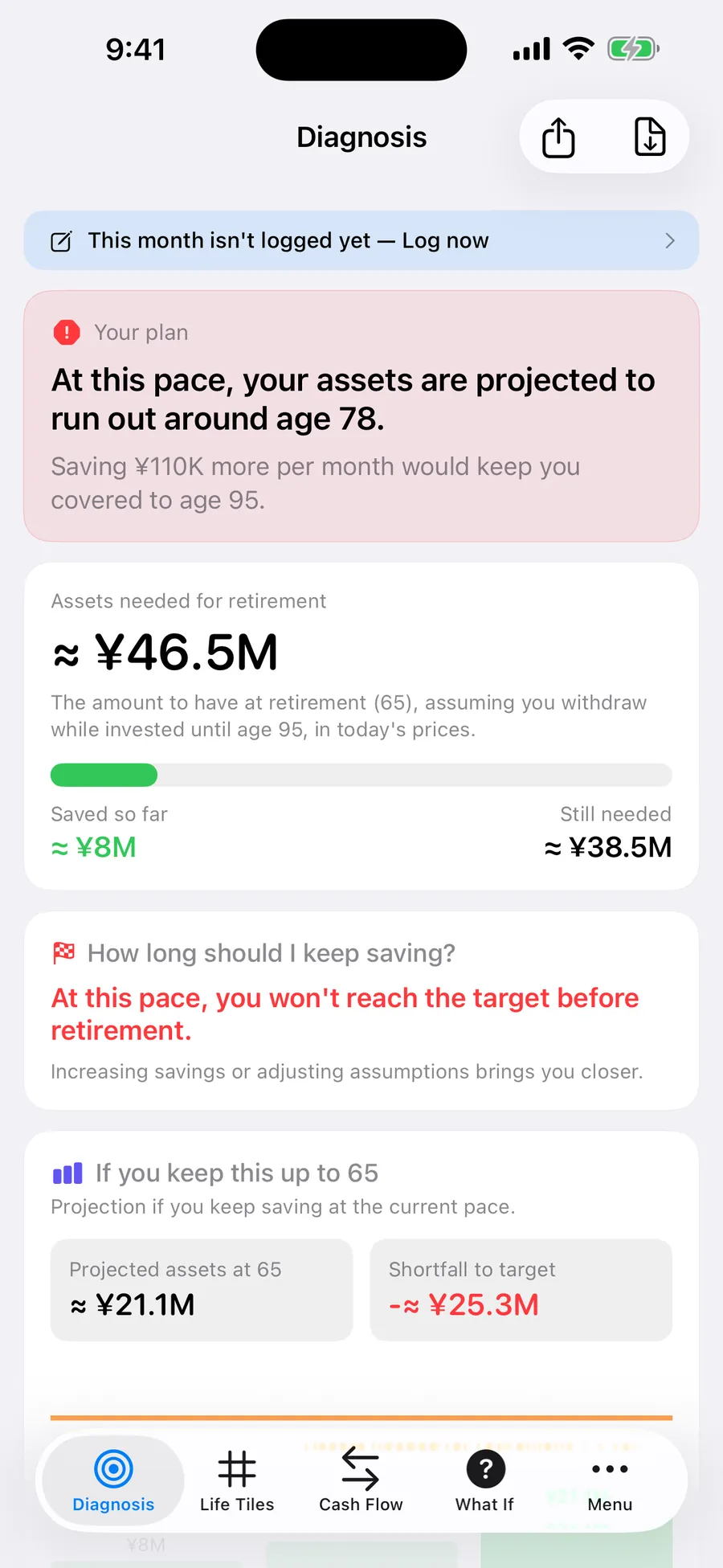
From your current assets, cash flow and pension, LifeTile estimates the age your assets may run out — and how much more per month it would take to reach your life expectancy.

Estimated asset lifespan Extra contribution needed Assumptions adjustable
Retirement check screen showing the estimated age assets run out
02 — Retirement check

How much more
do you need by 65?

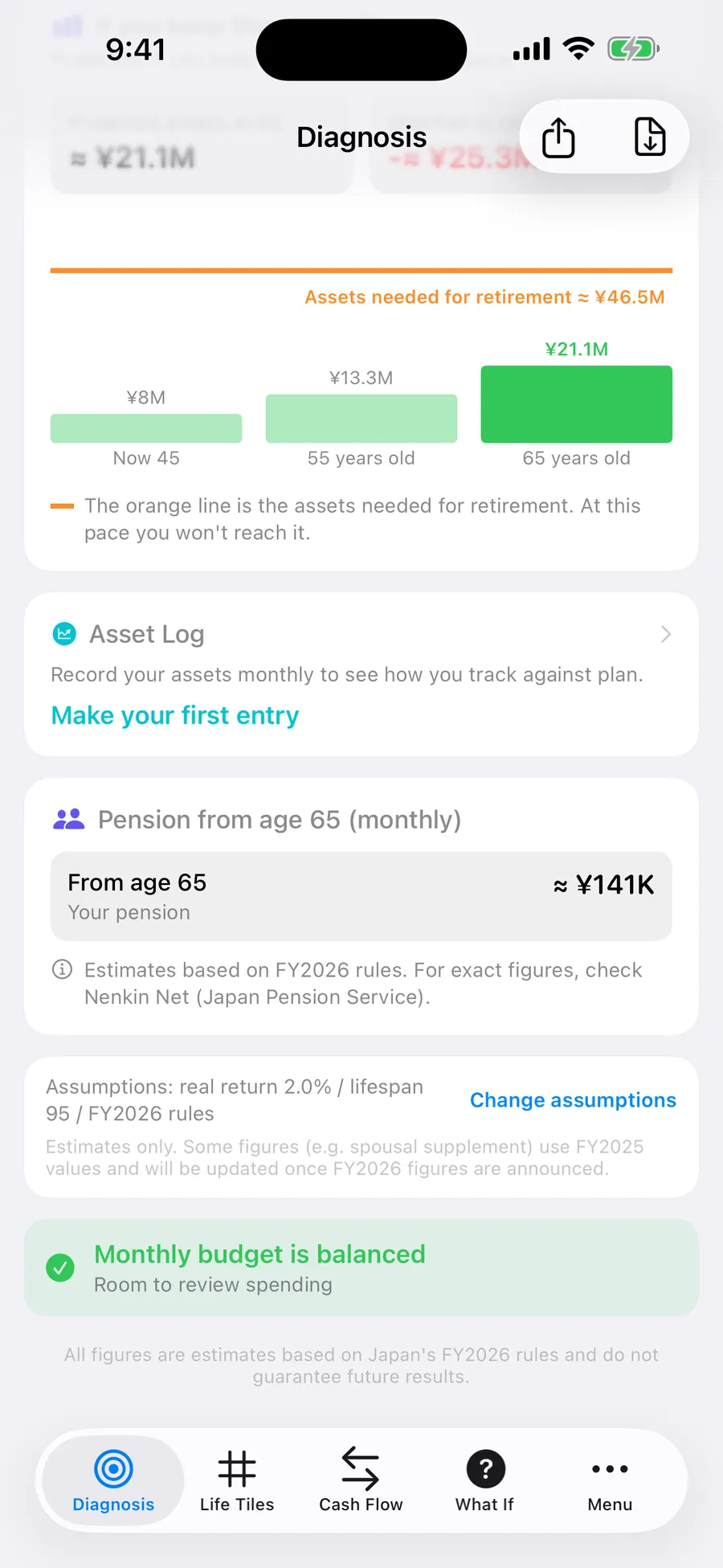
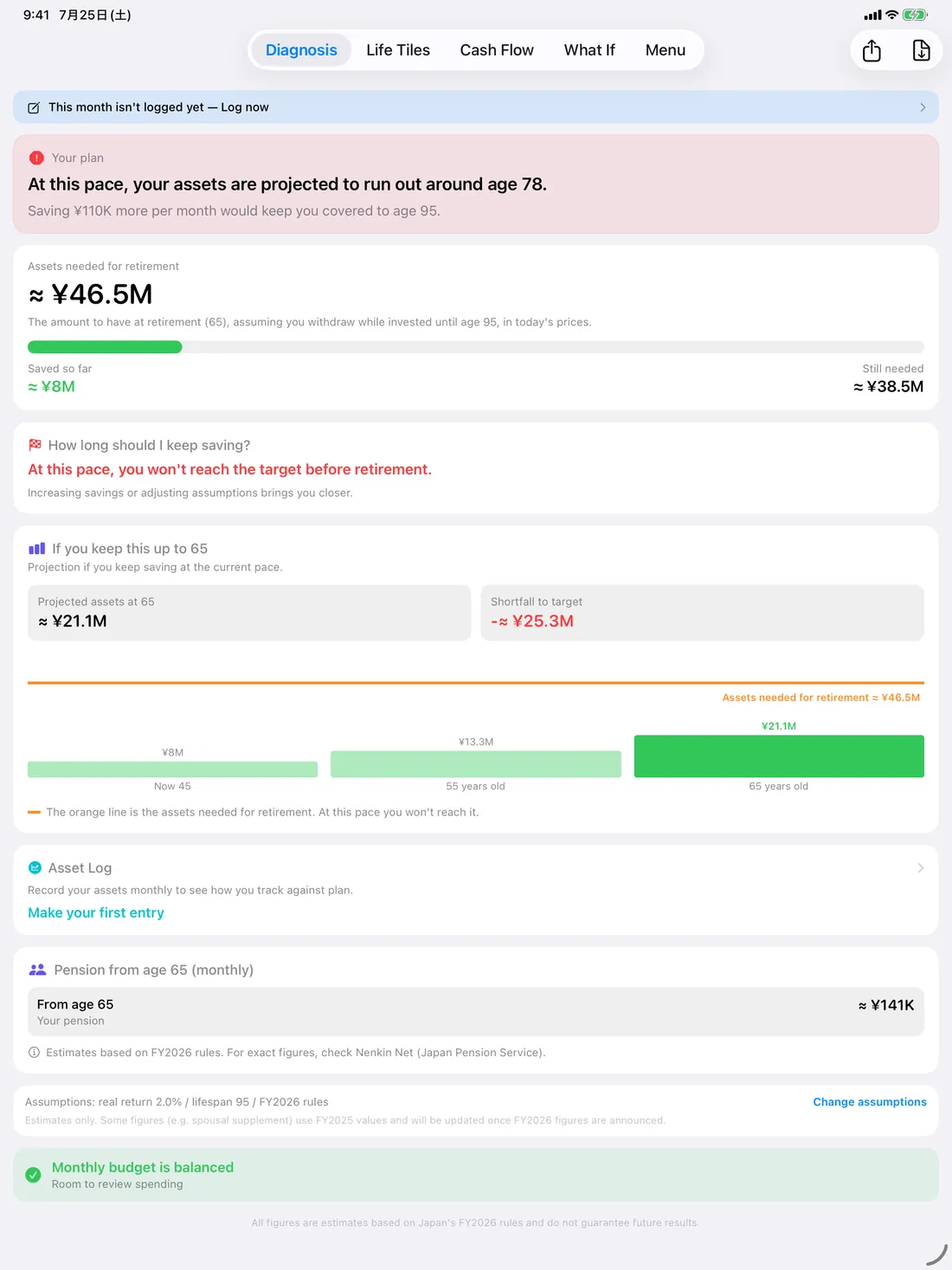
The assets you may want in place when you retire at 65, and the gap against what you have today. The same screen shows what you are projected to have at 65 if nothing changes.

  • Target, projection and shortfall side by side
  • Assumes a 3.5% annual drawdown after retiring (adjustable)
  • PDF export of the report (optional one-time purchase)
Retirement check screen showing projected assets at 65 and estimated monthly pension
03 — Cash flow

Where does your
money actually go?

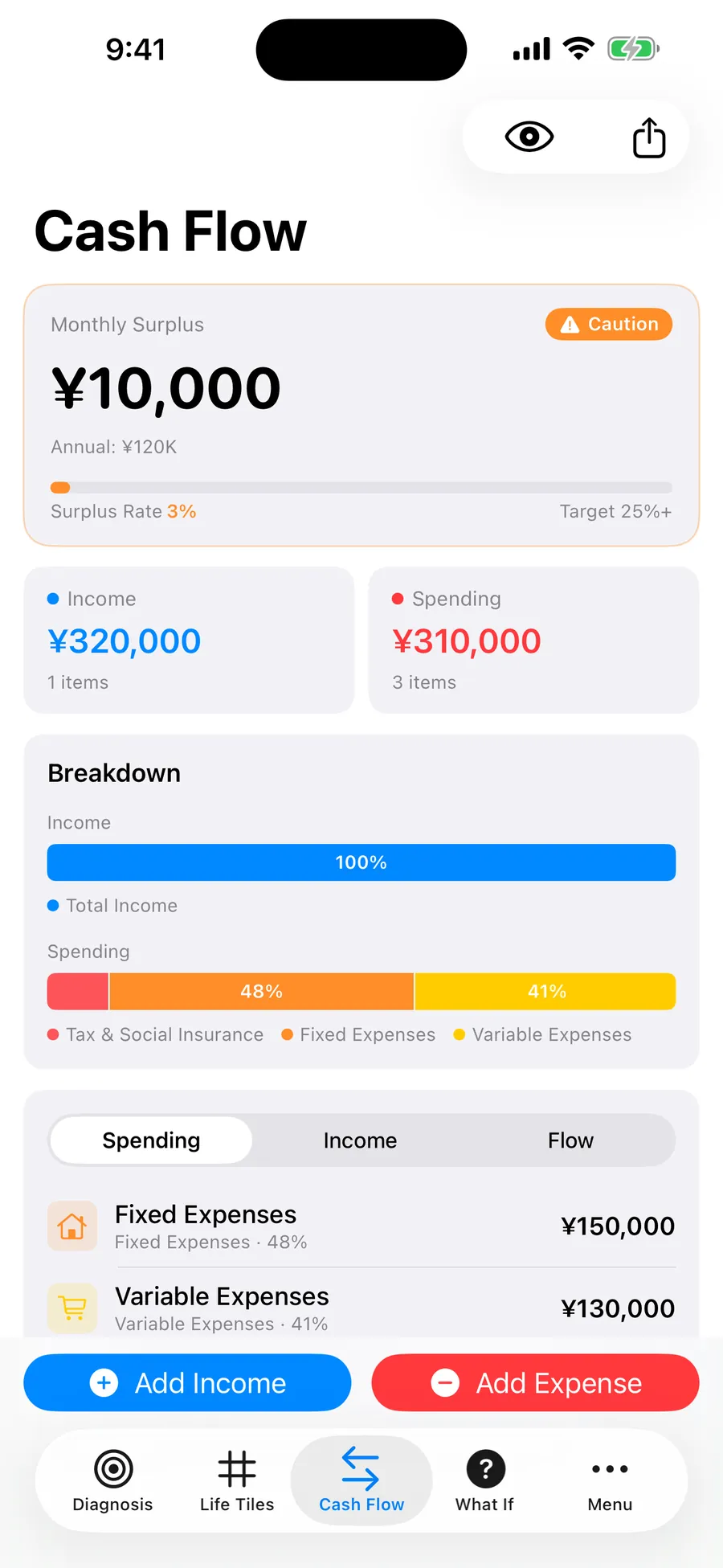
A Sankey view turns your monthly income and spending into flows whose thickness is the amount. Tax and social insurance, fixed costs and variable costs are separated, so the shape of your month is immediately readable.

Sankey view Category breakdown Surplus rate target
Cash flow screen showing monthly surplus, surplus rate and category breakdown
04 — What-if

What if your
plan is off?

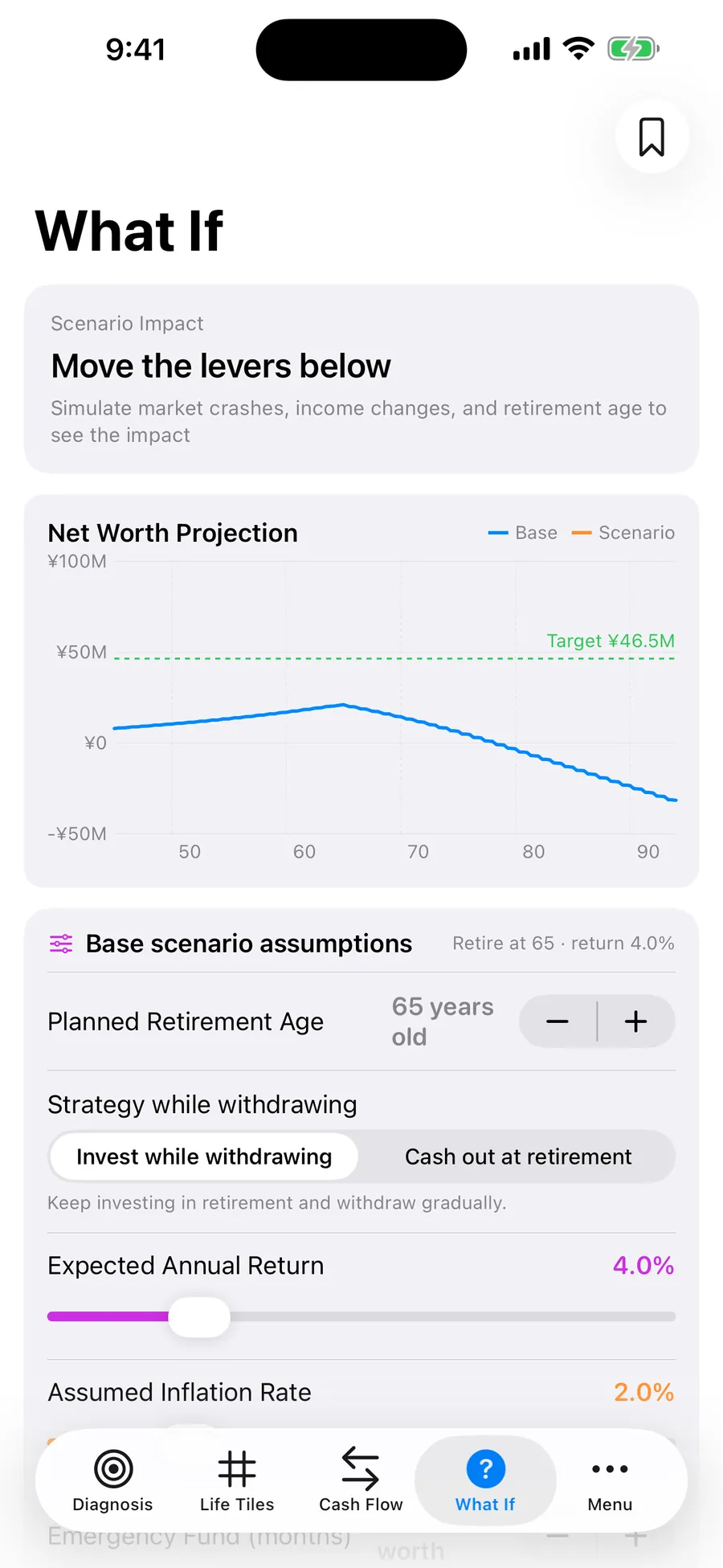
A market crash, a change in income, retiring early, higher inflation, a deferred pension. Move a lever and the net worth path is redrawn next to your current plan, so the size of the miss is something you can see.

  • Market crash (a temporary drop in assets)
  • Change in income
  • Early retirement
  • Inflation and expected return
What-if screen showing a net worth chart and the levers that change the assumptions
05 — Life grid

Birth to life expectancy,
by week, month or year.

Your life is laid out as tiles coloured by phase: past, saving, drawdown, caution and depleted. How many tiles you have left is something you notice as a shape, not a sentence.

Weekly / monthly / yearly Five phases Light & dark
Life grid 1 tile = 1 year / example at 45
Past Saving Drawdown Caution Depleted

An illustration of one example projection. In the app you can switch between weekly, monthly and yearly tiles.

About a minute a month

A projection
goes stale fast.

Record where you actually are once a month, and the drift between plan and reality becomes visible.

Asset log

Record your net worth

Enter cash and deposits, investments, real estate and debt. Estimates are fine. From the second entry onward you get a history chart and a comparison against your planned pace.

Entries are stored on your device.
Monthly report

Monthly report and streak

A monthly report shows your net worth and the change from last month. Consecutive months build a logging streak — the longer it runs, the easier the trend is to read.

Reminders

Notifications are opt-in

A weekly reminder (this week's tile) and a monthly one (on the 1st) can each be turned on in Settings. Both are off by default, and you can change the time.

Everything works whether or not you enable them.
Home Screen widget

Visible on the days
you don't open the app.

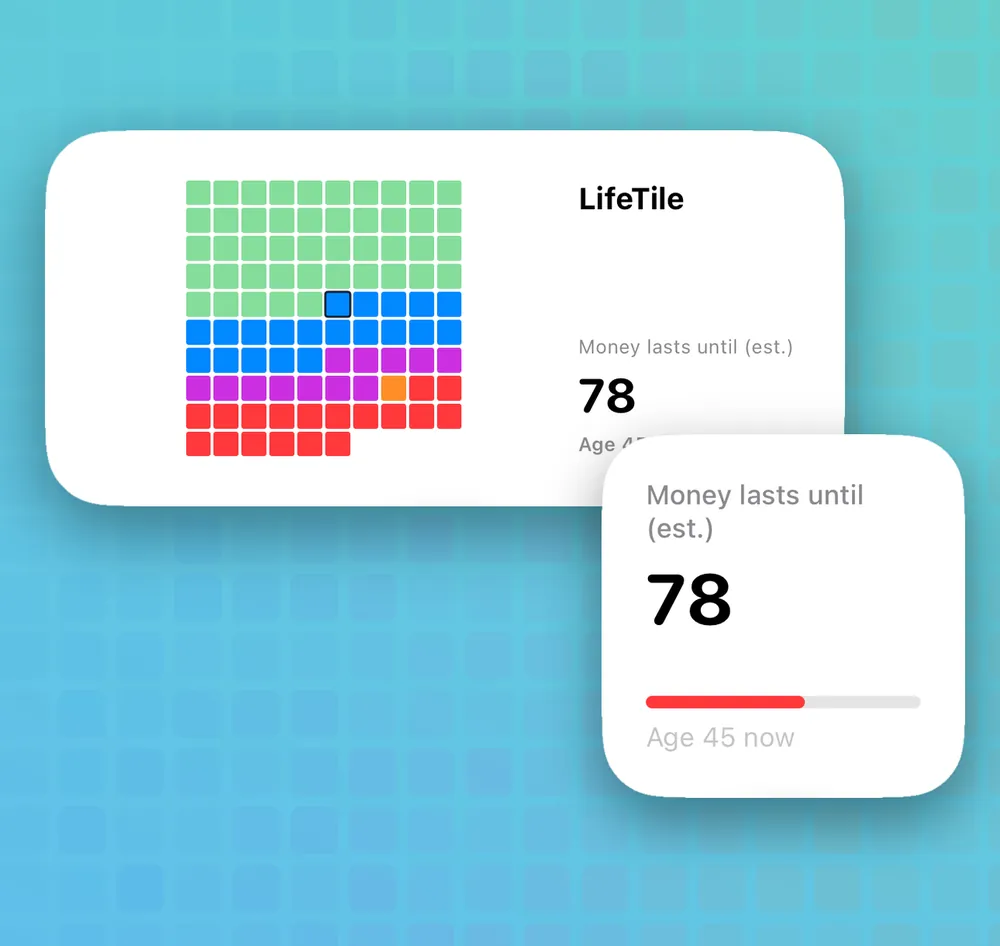
Home and Lock Screen widgets show your estimated asset lifespan. Tap one to open your retirement check.

  • The Home Screen widget shows your life tiles and estimated asset lifespan
  • A circular Lock Screen widget is included
  • Amounts are hidden by default and appear only if you turn them on
Your Home Screen may be visible to others. Turn amounts on only if you want them shown.
Home Screen widget showing life tiles and the estimated asset lifespan, with a Lock Screen widget
iPhone & iPad

More room,
easier to read.

On iPad the retirement check, cash flow and what-if scenarios get the space they deserve. The same features are available on iPhone and iPad.

iPhone iPad Light & dark Universal
LifeTile retirement check on iPad
Who it's for

For anyone who wants
retirement in concrete numbers.

01

People in their 40s and 50s getting serious about retirement savings

02

Anyone deciding whether to claim their pension early or defer it

03

Foreign residents in Japan enrolled in the Japanese pension system

04

People who dislike subscriptions and prefer free or one-time purchases

05

Anyone who wants to stress-test crashes, inflation or early retirement

Scope: all projections are based on Japan's public pension and tax system (FY2026). They apply if you are covered by that system, including foreign residents in Japan. Amounts are shown in Japanese yen (¥). Pension and tax systems of other countries are not supported.
Pricing

The app and its
core features are free.

LifeTile is free to download. The asset lifespan estimate, retirement check, cash flow, what-if scenarios, life grid, asset log, widget and reminders are all free. If you would rather not see ads, there is an optional one-time purchase.

  • ¥0 The app and its core features (with ads)
  • Optional One-time purchase: remove ads, PDF export, backup
FREE — start here
¥0 / download & use
No account, no sign-in. Start straight away.
  • Asset lifespan / retirement check
  • Cash flow / what-if / life grid
  • Asset log / widget / reminders
OPTIONAL — one-time purchase
One-time / single in-app purchase
For people who would rather not see ads. Optional — the core features work without it.
  • Remove all ads
  • PDF export of the report
  • Backup (export & import)

There is no monthly or annual subscription — the in-app purchase happens once. Please check the App Store for the current price.

How it's calculated

Built on published
public data.

The projections are implemented from official published figures, and every assumption behind them can be changed on screen.

01 — Public pension

Estimated on FY2026 rules

Claiming early reduces the amount by 0.4% per month (up to -24% at 60); deferring adds 0.7% per month (up to +84% at 75). Employees' Pension uses separate multipliers before and after the 2003 reform, and the spousal supplement handing over to the spouse's own pension is modelled over time.

Sources: Ministry of Health, Labour and Welfare; Japan Pension Service
02 — Life expectancy & spending

Official statistics as the starting point

Life expectancy defaults to 100 (80 / 90 / 100 selectable), with survival data from the ministry's abridged life tables. Retirement spending starts from public statistics and can be replaced with your own figure.

Sources: MHLW abridged life tables; Statistics Bureau of Japan and other public materials
03 — Your assumptions

All adjustable on screen

Expected return, inflation, retirement age, drawdown policy and life expectancy are yours to set. The defaults are only a starting point — change them and compare as often as you like.

Defaults: 4.0% expected return / 2.0% inflation / 3.5% withdrawal rate
All figures are estimates. Some values, such as the spousal supplement, currently use FY2025 figures and will be updated once the FY2026 figures are published. For your actual pension estimate, check the Japan Pension Service (Nenkin Net or your annual pension statement).
Privacy

Your money stays
on your phone.

Nothing you enter is sent to a server. There is no account and no sign-in.

No account

No registration, no sign-in. You can start projecting the moment it finishes downloading.

No bank linking

LifeTile never connects to a bank account or card. Everything is entered by hand.

Stored on device

Your entries stay on your device. Share images are rendered on the device and never uploaded.

Delete any time

You can erase all data from Settings, and deleting the app removes it completely.

Questions

FAQ

Is there a monthly subscription?+
No. LifeTile is free to download, and the asset lifespan estimate, retirement check, cash flow, what-if scenarios, life grid, asset log, widget and reminders are all free to use. There is one optional one-time purchase that removes ads and unlocks PDF export and backup. Please check the App Store for the current price.
Where is my data stored?+
Everything you enter stays on your device. Nothing is sent to or held on the developer's servers, and there is no account or sign-in mechanism at all.
Can I model claiming my pension earlier or later?+
Yes. Claiming early reduces the amount by 0.4% per month (up to -24% at age 60), and deferring increases it by 0.7% per month (up to +84% at age 75). Employees' Pension is calculated with separate multipliers before and after the 2003 reform. All figures are estimates.
Can I change the return and inflation assumptions?+
Yes. Expected return, inflation, retirement age, drawdown policy and life expectancy are all adjustable on screen. The defaults are 4.0% expected return, 2.0% inflation, a 3.5% withdrawal rate and a life expectancy of 100.
Does LifeTile give investment advice?+
No. LifeTile is an informational and educational simulation tool. It does not provide investment, financial, tax or legal advice, and does not recommend buying or selling any financial product. All figures are estimates and do not guarantee future results.
I live in Japan but I'm not Japanese. Does it work for me?+
Yes, if you are covered by the Japanese public pension system. The app is designed for people enrolled in that system, including foreign residents in Japan, and the interface is available in English and Japanese. Pension and tax systems of other countries are not supported.
Will the widget show my balance to other people?+
Amounts on the widget are hidden by default and appear only if you turn them on in Settings. Notifications are also off by default, and the weekly and monthly reminders are enabled separately. Amounts in share images are off by default too.
Is there an Android version?+
LifeTile is currently iOS only, and there is no announced plan for an Android version. Updates are posted on the developer's X account.
Developer

One developer,
one thing at a time.

LifeTile is made by Okojyo-Soft, an independent developer. Updates and development notes are posted below — feedback is always welcome.

Okojyo-Soft
Indie Developer · LifeTile

I build iOS apps on my own. I wanted a way to answer "how long will my money last?" with numbers instead of a feeling — so I made LifeTile.

Before you use LifeTile (disclaimer)

Purpose

LifeTile is a simulation tool for informational and educational purposes that visualizes your life plan and projected finances.

No advice

LifeTile does not provide investment, financial, tax or legal advice, and does not recommend buying or selling any financial product.

Basis of calculations

All projections are based on Japan's public pension and tax system (figures published for FY2026). Systems of other countries are not supported.

Accuracy

All figures are estimates. They do not guarantee future investment results, pension benefits or living costs. For your actual pension estimate, check the Japan Pension Service's "Nenkin Net" or your annual pension statement.

Your decisions

Before making important decisions, verify the latest official information yourself and consult a qualified professional where appropriate. To the maximum extent permitted by law, the developer accepts no liability for damages arising from use of this app.

Sources

Ministry of Health, Labour and Welfare; Japan Pension Service; Statistics Bureau of Japan; and other public materials. Please avoid using the app when you are not feeling well.

Contact

Bug reports and
feature requests welcome.

Open the form below and tell us what you found. Add your email address if you would like a reply.

Open the contact form Close the form

Only needed if you would like a reply.

If the form doesn't load, open it in a new tab ↗

How long will your money last? Free download · no account Get it free